
Getting Started with Print Fulfillment
Ready to start listing your designs as Physical Products on Etsy? We have step-by-step guides and instructions to help you get started quick!
📑 The Ordering Process
Here is an overview of the ordering process for a Physical Product listing on Etsy offering both the Digital Template option and Printed Invitations you will order on behalf of your customer.
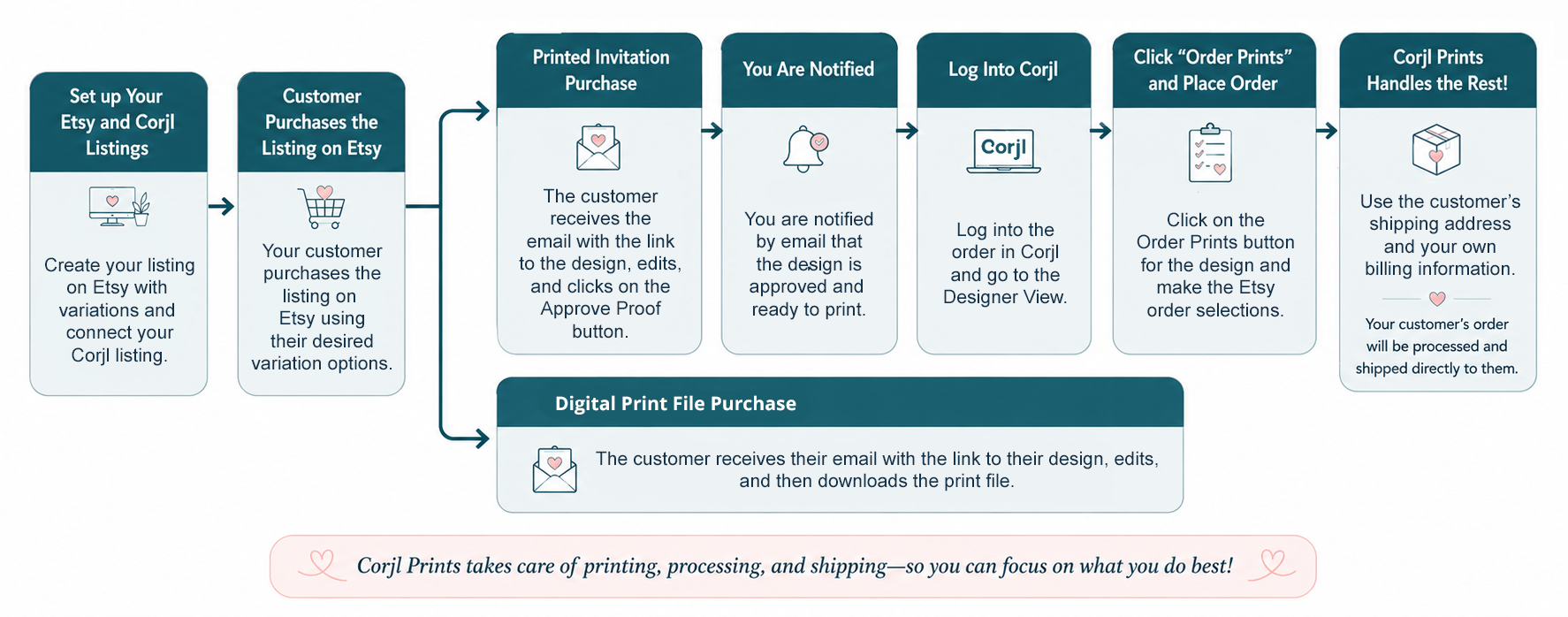
🛠️ Breaking It Down
You can get started offering printed designs in your current listings by following the three steps outlined below:
- Determine the prices you want to charge for printed copies of your design.
- Create or convert your Etsy listing as a Physical Product.
- Create your Corjl listing (or update your existing Corjl listing if converting a Digital Etsy listing) and assign your Variations.
The Help Articles listed below will walk you through each of these steps with detailed, easy-to-follow instructions:
Setting Prices with the Wholesale Fulfillment Pricing Tool
Learn how to set your Etsy prices based off of your Corjl Prints Wholesale printing and shipping costs.
Creating or Converting Physical Product Listings on Etsy
Provides information on adding Variations, dynamic Pricing, and setting up Shipping. Includes tips and Best Practices for managing Physical Product listings on Etsy.
Setting up your Corjl and Etsy listings with Variations
Learn how to set up listings that include options for both a digital template downloaded by the customer and printed items shipped to them.
Your most frequently asked print fulfillment questions are answered here.